🛒 The Target Shopping Cart
During the 8-week program, the students will be required to build a simple shopping cart using HTML, CSS and JavaScript.
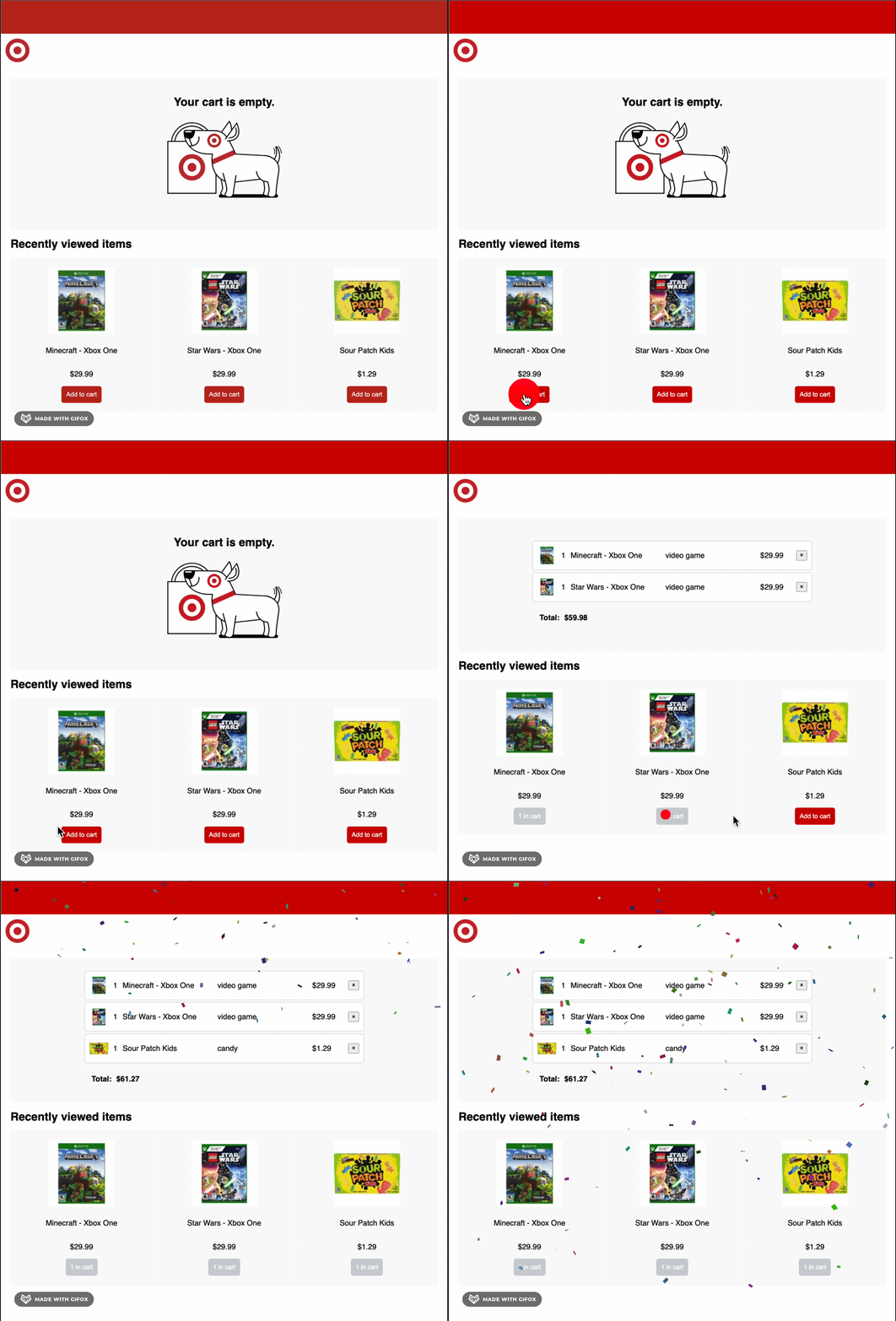
Here is an example of the Shopping Cart, but we will encourage students to create their own version of it and have fun experimenting with styles.
Requirements
Shopping Cart Page
- Should include a
Headersection and the Target logo - Should have a
Cartsection that will initially display a static image - Should have a
Recently Viewed Itemssection where at least three product cards will be displayed
Product Card
- Each product card should display the
product image,product description,price, andAdd to Cartbutton. - Upon clicking the Add to Cart button, the item will be added to the Cart section.
- After clicking the Add to Cart button, the button will become disabled, and the button text should change to display
1 in cart.
Cart Section
- When an item gets added to the cart a card should appear in the Cart section, it should display the
product image,quantity,description,priceand,removebutton. - Should display the cart
totalamount. - When clicking the remove button, the item should be removed from the cart. This will also make the Add to Cart button be reenabled in the corresponding product card.
Optional Extra Challenges
- Display the total tax amount in the cart.
- Allow users to add more than one of the same item to the cart. Adjust the quantities in the cart with every click of the Add to Cart button.
- Show some joyful animation after adding all three items to the cart.
Last updated on